Ditching the Dial: Why It’s Time to Upgrade Your Intermatic Pool Timer
If you own a pool in the Tampa Bay area—whether you are over in St. Petersburg enjoying the salt air or inland in Brandon managing a backyard oasis—you are likely familiar with the metallic “clank-clank” of a gray Intermatic T104 mechanical time clock. For decades, these heavy-duty brass-geared timers have been the undisputed workhorses of the pool industry. They turn your single-speed pump on in the morning and off in the evening. They are simple, durable, and completely analog.
But the pool industry has shifted. With the rise of variable-speed pumps, color-changing LED lights, salt chlorine generators, and advanced heat pumps, these mechanical timers have become a major bottleneck. Running a modern pool on a 1970s dial timer is like trying to control a smart TV with a rotary phone.
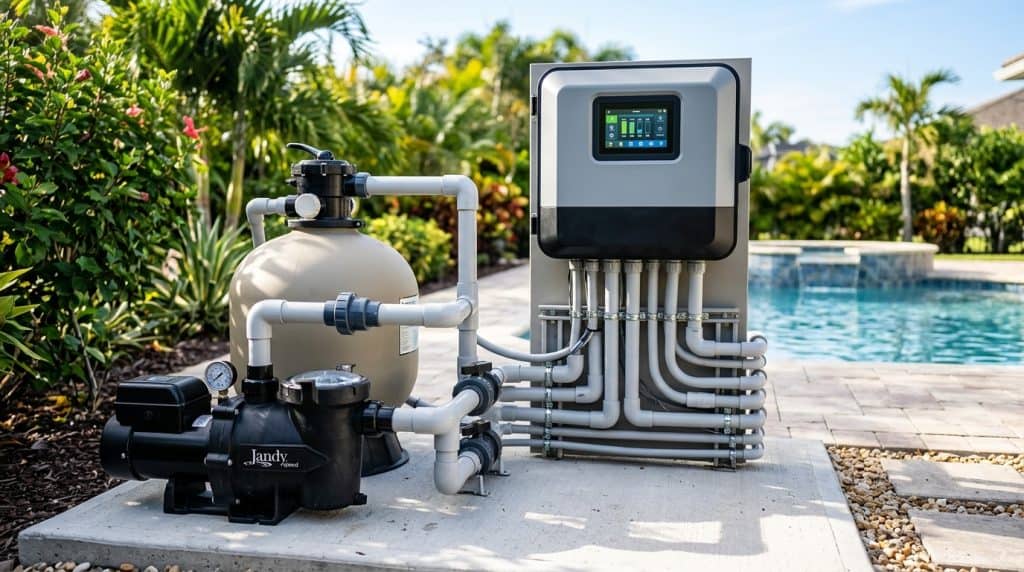
If you want to maximize your energy savings, control your pool from your smartphone, and seamlessly manage your spa, it is time to upgrade intermatic pool timer automation. In this comprehensive Florida CPO guide, we will explore how to successfully execute a smart pool automation system retrofitting project, comparing the market’s top-tier options: the Pentair IntelliCenter and the Hayward OmniLogic.
To keep your pool running flawlessly year-round, you can always rely on the professional technicians at Tampa Bay Pool Care to keep your chemistry balanced and your upgraded equipment in peak condition.
—
The Problem with Analog: Why Old Timers Cost You Money
In Florida, our pools run year-round. This constant operation makes pool equipment one of the largest consumers of electricity in a household. An old-school mechanical timer operates on a rigid, binary schedule. It is either 100% on or 100% off.
Modern variable-speed pumps, which are now federally mandated for most pool filtration setups, require dynamic programming. They need to run at low speeds for long periods to save electricity, and then ramp up to high speeds to operate a suction cleaner, chlorinator, or water feature.
If you try to run a variable-speed pump on a basic mechanical timer, you lose its smart programming capabilities. Every time the Intermatic timer cuts the power, the pump loses its internal clock and schedule. To truly capture the energy-saving benefits of modern equipment, you need a smart automation controller that can communicate directly with your pump via an RS-485 data link rather than simply cutting its power supply.
—
Pentair IntelliCenter vs. Hayward OmniLogic: Choosing Your Platform
When migrating to smart automation, you will likely choose between the two major industry standards: Pentair and Hayward. Both systems are outstanding, but they cater to slightly different equipment setups and user preferences.
Pentair IntelliCenter: The Modern Standard
The Pentair IntelliCenter is Pentair’s flagship automation system. It features a color touchscreen built directly into the outdoor panel, integrated wireless connectivity, and an incredibly intuitive smartphone app.
If you are upgrading an older Pentair system, you might have heard of ScreenLogic. When considering a pentair screenlogic vs intellicenter upgrade, the decision today is simple. ScreenLogic is a legacy protocol that requires an external wireless adapter, a protocol interface connected to your indoor router, and an older generation EasyTouch or IntelliTouch board.
The IntelliCenter eliminates all of this clutter. It features built-in Wi-Fi, over-the-air firmware updates, and natively handles complex schedules, chemical monitoring, and multi-colored LED light shows without needing extra adapter cards. If you already have a Pentair IntelliFlo variable-speed pump, the IntelliCenter is the most seamless pairing you can buy.
Hayward OmniLogic: The Ultimate in Customization
If your pool pad is built around Hayward equipment—such as an AquaRite salt chlorinator or a TriStar variable-speed pump—the Hayward OmniLogic is an elite competitor.
The OmniLogic is highly praised for its flexible programming. It handles complex, multi-tiered water features, deck jets, automated spa valves, and backyard landscape lighting with ease. The app interface is clean, modern, and highly responsive. It also integrates seamlessly with smart home platforms like Amazon Alexa and Google Home, allowing you to voice-activate your spa heater while sitting on your patio.
—
Diagnostic Checklist: Is Your Pool Pad Ready for an Upgrade?
Before you purchase a new automation panel, you need to audit your current equipment pad. Use this CPO checklist to determine what hardware you need to order alongside your smart automation panel:
- How many high-voltage (120V/240V) devices do you have? Count your filter pump, booster pump, cleaner, blower, pool light, spa light, and salt cell. This determines how many relays (high-voltage switches) your new panel must support.
- Do you have a pool/spa combo? If you have a shared filtration system that switches between a pool and a raised spa, you will need automatic valve actuators (like the Pentair Valve Actuator or Hayward GVA-24) to turn your plumbing valves automatically.
- Are your pumps variable-speed? Check if your pump has a communication port (RS-485). Smart panels control these pumps via low-voltage data wires, not high-voltage relays.
- Do you have a salt system? If you want to control your salt chlorinator from your phone, you should purchase an automation panel that includes an integrated salt chlorine generator power center.
- Is your internet signal strong at the equipment pad? Because these systems rely on cloud connectivity for app control, you may need a Wi-Fi range extender or an Ethernet-over-powerline adapter to ensure a stable connection to your outdoor panel.
—
Step-by-Step Retrofit: The Pool Relay Panel Wiring Guide
Replacing an Intermatic timer with a smart automation panel requires handling high-voltage electrical connections (120V/240V) and low-voltage communication wiring. Always turn off the main breaker at your home’s main electrical panel before opening any pool equipment covers.
Here is a practical pool relay panel wiring guide to help you understand how a professional CPO retrofits your system:
Step 1: Demolishing the Old Intermatic Setup
Disconnect the wires from the old Intermatic T104 yellow dial. You will typically find a Line 1, Line 2, Load 1, Load 2, and a ground wire. Label these clearly with masking tape. Unscrew the metal box from your wall or mounting posts. If you have multiple boxes (e.g., one for the pump, one for the pool light), remove them all to create clean wall space for your new, consolidated automation enclosure.
Step 2: Mounting the New Enclosure
Mount your new Pentair IntelliCenter or Hayward OmniLogic panel to your wall or posts. Ensure it is at a comfortable working height and conforms to local Florida building codes regarding clearance from your pool water (usually at least 5 feet from the water’s edge).
Step 3: Managing the High-Voltage Power (The Relays)
Smart automation panels feature a high-voltage compartment at the bottom containing several heavy-duty relays (usually rated for 3 horsepower or 30 Amps).
- Constant Power Devices: Modern variable-speed pumps need constant power. Connect the main line breaker directly to the pump’s power terminals, bypass any relays, and run a dedicated low-voltage RS-485 communication cable from the pump’s drive to the automation board’s com-port.
- Relay-Controlled Devices: For single-speed booster pumps, pool lights, or blowers, wire the incoming power to the “Line” side of an auxiliary relay, and wire the device to the “Load” side of that same relay. When you activate the light via the app, the automation board sends 24V to the relay coil, closing the high-voltage contacts and powering your light.
Step 4: Connecting the Low-Voltage Sensors and Actuators
In the upper, low-voltage compartment of your new panel, connect your diagnostic sensors. You will need to install a water temperature sensor in your plumbing line (drilled and clamped after the pump but before the heater) and an air temperature sensor mounted underneath the control panel out of direct sunlight. If you have a pool/spa combo, plug your automated valve actuators into the designated ports on the motherboard.
Note: If you do not feel comfortable working with high-voltage electricity or low-voltage motherboard programming, contact a licensed pool electrician or a certified CPO to handle the physical installation.
—
Florida-Specific Challenges: Protecting Your Investment
Retrofitting a pool panel in the Tampa Bay area presents unique environmental challenges that you wouldn’t have to worry about in other parts of the country. When designing your smart pool automation system retrofitting project, keep these regional factors in mind:
1. Lightning Capital of the US
Tampa Bay is famous for its sudden, violent afternoon summer thunderstorms. A single nearby lightning strike can send a massive voltage spike through your power lines, instantly frying a $1,000 smart automation motherboard.
When upgrading, it is absolutely essential to install a dedicated surge protector (such as the Intermatic AG3000 or a specialized Pentair surge protector) directly into your automation panel. This cheap device can save you thousands of dollars in replacement electronics.
2. Salt Air Corrosion
If you live near the Gulf in places like Clearwater, Madeira Beach, or Apollo Beach, the salty air will quickly corrode cheap metals. Ensure all conduit fittings are watertight, use rust-resistant stainless steel mounting hardware, and ensure your smart panel’s door remains tightly sealed to prevent salt air and humidity from getting inside the motherboard compartment.
3. Extreme Heat and Insects
The intense Florida sun can degrade LCD screens quickly. Try to mount your new panel in a shaded area, or purchase a panel cover shield to protect the screen from direct sunlight. Additionally, Florida frogs, wasps, and ants love the warmth inside electrical boxes. Use silicone caulk to seal any open knockouts at the bottom of the enclosure to prevent pests from nesting on your motherboard and causing a short circuit.
—
Summary Comparison: IntelliCenter vs. OmniLogic
To help you decide which path to take for your home, here is a quick breakdown of how these two leading systems compare:
| Feature | Pentair IntelliCenter | Hayward OmniLogic |
|---|---|---|
| Best Paired With | IntelliFlo Pumps, MasterTemp Heaters | TriStar Pumps, AquaRite Salt Systems |
| User Interface | Highly intuitive, color touchscreen on-unit | Advanced customization, robust app widgets |
| Connectivity | Integrated Wi-Fi, Ethernet, or wireless link | Ethernet base, optional wireless bridge |
| Smart Home Support | Excellent open API, Alexa integration | Native Alexa, Google Home, Control4, Nest |
—
Conclusion: Bring Your Pool into the 21st Century
An automation upgrade is one of the most rewarding investments you can make for your Florida home. It transforms your pool from a daily chore of turning valves and clicking dials into a luxurious, hands-free backyard experience. Whether you choose the sleek, unified design of the Pentair IntelliCenter or the highly customizable, smart-home-friendly Hayward OmniLogic, migrating away from manual Intermatic timers will save you money, reduce chemical consumption, and give you complete control over your pool from anywhere in the world.
Once your high-tech upgrade is up and running, let us take care of the rest. Contact Tampa Bay Pool Care to set up a professional pool maintenance plan, ensuring your newly automated pool remains crystal clear, safe, and balanced all year long.